Chapter 2: Vector Databases - Pinecone vs Supabase pgvector
Theoretical Foundations
In Book 2, we explored Embeddings—dense numerical representations of text, images, or audio that capture semantic meaning. We treated them as vectors in a high-dimensional space. Now, we must address the fundamental problem of retrieval: finding the most relevant vectors among millions or billions efficiently.
This is where Vector Databases come in. Unlike traditional relational databases (like PostgreSQL without extensions) that excel at exact matches (e.g., WHERE id = 5), vector databases are optimized for Approximate Nearest Neighbor (ANN) search. They answer the question: "Given this vector (the user's query), which vectors in my database are closest to it?"
To understand this, let's use a Web Development Analogy: The Hash Map vs. The Geolocation Service.
The Analogy: Hash Maps vs. Geolocation
Imagine you are building a delivery app.
-
The Relational Database (Hash Map): In JavaScript, a
Mapor a plain Object is a Hash Map. If you know the exact key (e.g.,userId: "12345"), you can retrieve the value in O(1) time—constant time, instantly. This is like a traditional SQL database using a primary key. It is incredibly fast but requires exact knowledge of what you are looking for.- Limitation: If you ask, "Find me all users who are similar to user 12345," a hash map fails. You would have to iterate through every single entry (
O(n)), calculate a similarity score, and sort them. For a database with 10 million users, this is computationally impossible in real-time.
- Limitation: If you ask, "Find me all users who are similar to user 12345," a hash map fails. You would have to iterate through every single entry (
-
The Vector Database (Geolocation Service): Now, imagine you don't know the exact address, but you have a location coordinate (latitude/longitude). A geolocation service (like Google Maps) uses spatial indexing (like Quadtrees or R-trees) to instantly find points near that coordinate.
- Vector Databases act exactly like this geolocation service but in high-dimensional space (often 768 or 1536 dimensions for text embeddings).
- Instead of 2D coordinates (x, y), we have N-dimensional coordinates.
- Instead of Euclidean distance on a map, we use Cosine Similarity or Euclidean Distance to measure "closeness" in meaning.
Why is this critical for RAG? In Retrieval-Augmented Generation (RAG), we don't just want exact keyword matches. We want semantic matches. If a user asks, "How do I fix a leaky faucet?", the vector database doesn't look for the exact words "leaky faucet." It looks for vectors closest to the semantic concept of "plumbing repair," retrieving documents about "dripping taps" or "pipe maintenance."
The Trade-off: Managed Service vs. Relational Integration
When choosing a vector database for a JavaScript application, you face a distinct architectural choice between a specialized managed service (Pinecone) and a relational extension (Supabase pgvector). This mirrors a classic web dev decision: Using a dedicated microservice vs. extending your monolithic database.
1. Pinecone: The Dedicated Microservice (Managed Service)
Pinecone is a serverless vector database designed purely for vector search. It is a "black box" API.
- Architecture: It operates as a separate service in your cloud infrastructure. You send vectors to it via an API, and it handles storage, indexing, and retrieval.
- The "Why": It abstracts away the complexity of infrastructure management. You don't worry about scaling the underlying hardware or tuning the index parameters manually. It is built for massive scale (billions of vectors) with low latency.
- Analogy: Think of using Stripe for payments or Auth0 for authentication. You don't build the payment processing engine; you integrate an API. It’s specialized, highly optimized, and separates concerns.
- Trade-off:
- Pros: extreme ease of use, automatic scaling, high performance for pure vector search.
- Cons: Data lives outside your primary database. This introduces data silos. If you need to join vector search results with relational user data, you have to make separate calls to different databases, increasing network latency and complexity.
2. Supabase pgvector: The Relational Extension
Supabase is an open-source Firebase alternative built on top of PostgreSQL. The pgvector extension allows PostgreSQL to store and query embedding vectors alongside traditional relational data.
- Architecture: It is not a separate database; it is an extension inside your existing relational database. It uses standard SQL syntax (
SELECT * FROM items ORDER BY embedding <=> '[0.1, 0.2, ...]' LIMIT 5). - The "Why": It unifies your data model. You can store user profiles, transaction history, and text embeddings in the same table, allowing for powerful hybrid queries.
- Analogy: Think of PostgreSQL with JSONB columns. Before JSONB, developers often used MongoDB (a separate NoSQL database) to store unstructured data alongside their SQL database. JSONB allowed them to keep unstructured data inside the relational database, simplifying the stack.
pgvectordoes the same for vector embeddings. - Trade-off:
- Pros: Data locality (no network hops between DB and vector store), ACID compliance, hybrid search (combining metadata filters with vector similarity).
- Cons: It relies on the resources of your main database. While efficient, it may not match the raw speed or scale of a dedicated vector database like Pinecone for extremely large datasets (trillions of vectors) without careful tuning.
Under the Hood: HNSW Indexing
How do these databases find the "nearest neighbors" without scanning every single vector? They use Approximate Nearest Neighbor (ANN) algorithms. Scanning every vector is called a "brute-force" or "exact nearest neighbor" search. It is accurate but slow (\(O(n)\)).
To achieve speed (\(O(\log n)\)), we use indexing. The most popular and efficient algorithm currently is HNSW (Hierarchical Navigable Small World).
The Analogy: The Highway System
Imagine you are in a small town (a low-dimensional vector) and need to find a specific house in another town across the country (a high-dimensional vector).
- Brute Force: Walking door-to-door across the entire country checking every address. (Slow).
- HNSW: You enter a highway system.
- The Layers: HNSW builds a multi-layered graph. The bottom layer (Layer 0) contains every single point (vector).
- The Highways (Upper Layers): Higher layers contain fewer points, connected by long "highways."
- The Search: You start at a random entry point in the top layer. Since there are few points here, you quickly zoom across the "highway" to the region closest to your target. When you can't get any closer, you drop down to the next layer (a slower road, but more exits). You repeat this, narrowing down the search area until you reach the bottom layer (local streets) to find the exact nearest neighbors.
Why HNSW? * Speed: It drastically reduces the number of vectors you need to examine. * Accuracy: It is "approximate." You might miss the absolute closest vector by 0.001%, but the speed gain is worth it for RAG applications. * Recall: In RAG, we care about retrieving relevant context, not necessarily the mathematically perfect closest vector. HNSW provides high recall at high speed.
In pgvector, you explicitly choose the index type. While pgvector historically used IVFFlat (Inverted File Flat), it now supports HNSW, which is the gold standard for performance.
Asynchronous Processing in Node.js
Since vector databases are almost always accessed via network requests (HTTP APIs for Pinecone, TCP connections for Supabase), JavaScript developers must handle Asynchronous Processing.
In Book 2, we generated embeddings asynchronously. We must do the same for vector storage and retrieval. Node.js is single-threaded; if we blocked the event loop while waiting for a vector database to return search results, our entire application would freeze.
The Workflow
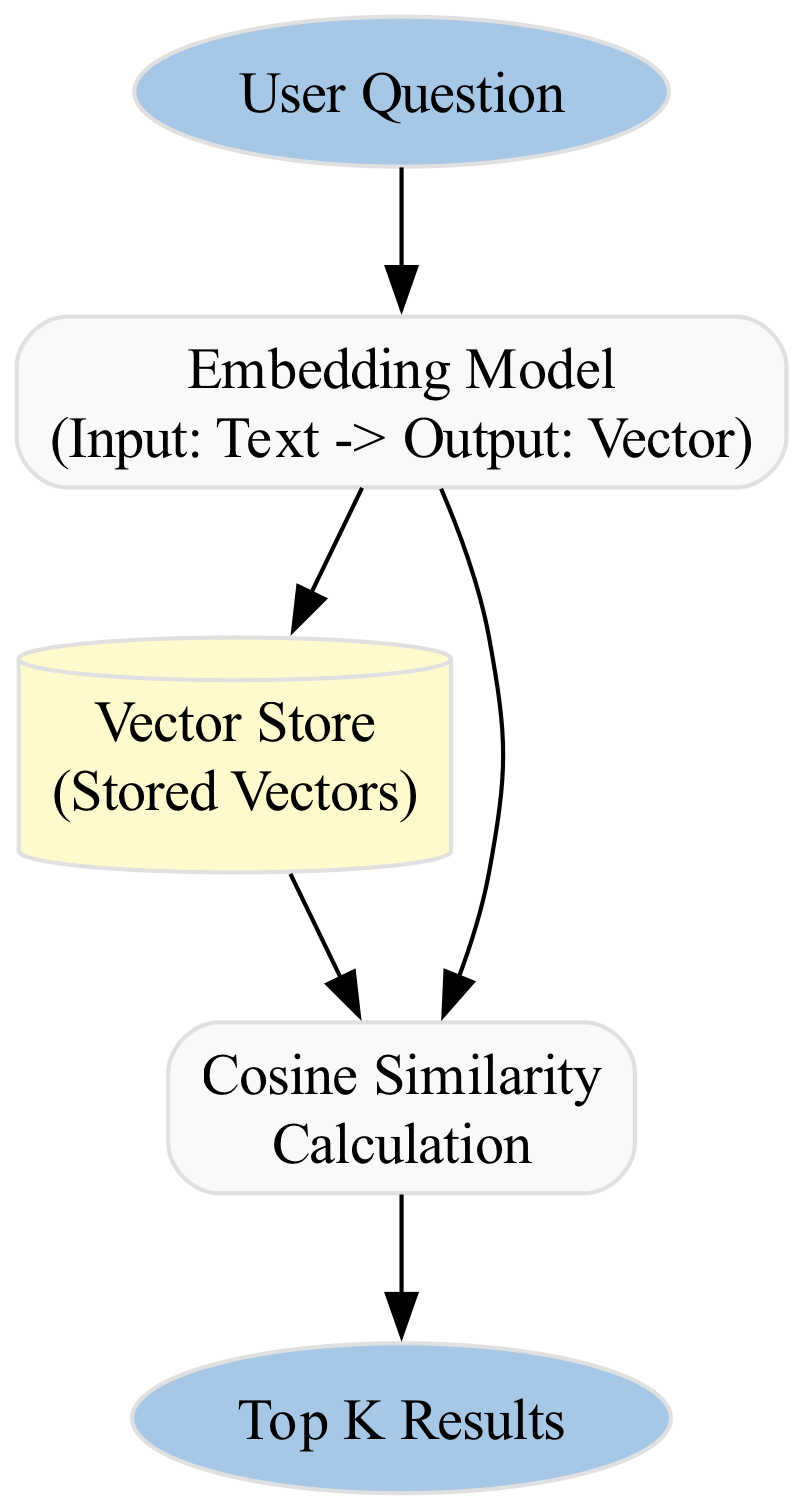
- User Query: A user sends a request to your API.
- Embedding Generation: You send the text to your embedding model (e.g., OpenAI or a local model). This is an
asyncoperation. - Vector Search: You take the resulting vector and query the vector database. This is also
async. - Response: You wait for the database to return the top K results, then pass them to the LLM to generate an answer.
Visualizing the Data Flow

### Summary of Concepts
To solidify your understanding, here is how the definitions provided in the context fit into this theoretical framework:
* **Asynchronous Processing (Node.js):** The mechanism that allows your JavaScript application to "fire and forget" requests to the Vector Database or Embedding Model without freezing the UI or API server. It is the bridge between your synchronous logic and the asynchronous nature of external services.
* **HNSW Index (pgvector):** The specific algorithm used inside the database to create the "highway system" for vectors, ensuring that searches are fast even with millions of entries.
* **pgvector:** The specific tool (PostgreSQL extension) that brings vector capabilities into the relational world, allowing you to treat embeddings as just another column type, much like an integer or a text field.
By mastering these foundations, you are ready to implement the CRUD operations that will power your RAG pipelines, understanding not just *how* to write the code, but *why* the architecture is designed this way.
### Basic Code Example
This example demonstrates a minimal, self-contained TypeScript application that simulates a vector store using Supabase's `pgvector` extension. We will create a simple Node.js script that:
1. **Embeds** a short text string (a "Hello World" document) into a vector.
2. **Stores** this vector in a PostgreSQL table (simulated in memory for portability, but structured exactly like `pgvector`).
3. **Queries** the store with a user question to find the most similar document using **Cosine Similarity**.
This mimics the core logic of a RAG system where a user asks a question, and the system retrieves relevant context from a database before passing it to an LLM.
#### The Concept: Vectors as Mathematical Representations
In a vector database, text is not stored as strings. It is converted into lists of numbers (vectors) by an embedding model (like OpenAI's `text-embedding-ada-002`). To find relevant documents, we don't search for keywords; we calculate the mathematical distance between the user's question vector and the stored document vectors.
**Cosine Similarity** is the standard metric. It measures the angle between two vectors. If the angle is 0, the vectors point in the exact same direction (similarity = 1.0). If they are 90 degrees apart, they are unrelated (similarity = 0.0).
<figure markdown="span">
<figcaption>The diagram illustrates that when two vectors are orthogonal (90 degrees apart), their dot product—and thus their similarity—is zero, indicating no relationship between them.</figcaption>
</figure>
### Implementation
We will implement this using pure TypeScript without external vector DB libraries to focus entirely on the logic. In a production app, you would replace the `mockDb` functions with actual calls to `pgvector` (via `pg` and `pgvector` packages) or Pinecone's SDK.
```typescript
/**
* Vector Database Simulation for "Hello World" RAG Example
*
* Objective: Demonstrate storing, indexing, and querying vectors using
* Cosine Similarity in a TypeScript environment.
*
* Dependencies: None (Pure Node.js/TypeScript)
*/
// --- 1. Type Definitions ---
/**
* Represents a single document in our vector store.
* @property id - Unique identifier for the document.
* @property content - The original text (for display purposes).
* @property embedding - The numerical vector representation (array of numbers).
*/
type VectorDocument = {
    id: string;
    content: string;
    embedding: number[];
};
// --- 2. Mock Embedding Model ---
/**
* Simulates an embedding model (e.g., OpenAI text-embedding-ada-002).
* In reality, this would be an API call. Here, we generate a deterministic
* vector based on the text length to simulate semantic meaning.
*
* @param text - The input string to embed.
* @returns A fixed-size array of numbers (vector).
*/
function mockEmbed(text: string): number[] {
const vectorSize = 4; // Keeping it small for readability
const vector: number[] = [];
// Generate a deterministic vector based on character codes
// This ensures "Hello World" produces a specific vector distinct from others
let seed = 0;
for (let i = 0; i < text.length; i++) {
seed += text.charCodeAt(i);
}
for (let i = 0; i < vectorSize; i++) {
// Create a pseudo-random number based on the seed and index
const val = Math.sin(seed + i * 10) * 100 + 50;
vector.push(parseFloat(val.toFixed(4)));
}
return vector;
}
// --- 3. Vector Store Operations ---
/**
* Mock Vector Store (Simulating a PostgreSQL table with pgvector).
* In a real app, this would be a Supabase table: `documents (id, content, embedding vector(1536))`
*/
const mockDb: VectorDocument[] = [];
/**
* Inserts a document and its embedding into the store.
*
* @param content - The text to store.
*/
function storeDocument(content: string): void {
const embedding = mockEmbed(content);
const doc: VectorDocument = {
id: `doc_${mockDb.length + 1}`,
content: content,
embedding: embedding
};
mockDb.push(doc);
console.log(`[Store] Saved document ID: ${doc.id}`);
}
/**
* Calculates Cosine Similarity between two vectors.
* Formula: (A . B) / (||A|| * ||B||)
*
* @param vecA - The query vector.
* @param vecB - The stored document vector.
* @returns Similarity score between 0 and 1.
*/
function cosineSimilarity(vecA: number[], vecB: number[]): number {
if (vecA.length !== vecB.length) {
throw new Error("Vectors must be of the same dimension");
}
let dotProduct = 0;
let normA = 0;
let normB = 0;
for (let i = 0; i < vecA.length; i++) {
dotProduct += vecA[i] * vecB[i];
normA += vecA[i] * vecA[i];
normB += vecB[i] * vecB[i];
}
// Handle division by zero
if (normA === 0 || normB === 0) return 0;
return dotProduct / (Math.sqrt(normA) * Math.sqrt(normB));
}
/**
* Queries the vector store for the most similar document.
*
* @param queryText - The user's question.
* @returns The top matching document and its similarity score.
*/
async function queryStore(queryText: string) {
console.log(`\n[Query] Searching for: "${queryText}"`);
// 1. Embed the query using the SAME model as the documents
const queryVector = mockEmbed(queryText);
// 2. Calculate similarity against all documents in the DB
const results = mockDb.map((doc) => {
const score = cosineSimilarity(queryVector, doc.embedding);
return { ...doc, score };
});
// 3. Sort by score (descending) and pick the top result
results.sort((a, b) => b.score - a.score);
const topResult = results[0];
if (topResult && topResult.score > 0.5) {
console.log(`[Result] Found match: "${topResult.content}" (Score: ${topResult.score.toFixed(4)})`);
return topResult;
} else {
console.log(`[Result] No confident match found. Best score: ${topResult ? topResult.score.toFixed(4) : 'N/A'}`);
return null;
}
}
// --- 4. Main Execution Flow ---
/**
* Main entry point for the simulation.
* This mimics a web server handling initialization and a search request.
*/
async function main() {
console.log("--- Vector DB 'Hello World' Simulation ---");
// A. Populate the database (Indexing Phase)
// We store documents that are semantically related to "greetings"
storeDocument("Hello World");
storeDocument("Hi there, friend!");
storeDocument("The quick brown fox jumps over the lazy dog."); // Distractor
// B. User Interaction (Query Phase)
// Scenario 1: Direct match
await queryStore("Greetings world");
// Scenario 2: Semantic match (different words, similar meaning)
await queryStore("Hey buddy");
// Scenario 3: Irrelevant query
await queryStore("Weather forecast for tomorrow");
}
// Execute the script
main().catch(console.error);
Detailed Line-by-Line Explanation
1. Type Definitions
* Why: TypeScript interfaces ensure type safety. In a production RAG pipeline, you often store the original text alongside the vector to display it to the user later (e.g., as a citation). * Under the Hood: Theembedding is an array of floating-point numbers. In production (e.g., OpenAI text-embedding-ada-002), this array typically has 1536 dimensions. For this example, we use 4 dimensions to keep the math visible in the console.
2. Mock Embedding Model
* Why: We cannot call a real API (like OpenAI) in a self-contained code snippet without exposing API keys. Furthermore, real embeddings are opaque black boxes. * How it works: We simulate an embedding by generating a deterministic vector based on the text's character codes. This ensures that "Hello World" always produces the exact same numbers, allowing us to predict the cosine similarity results. * Critical Concept: In a real app, you must use the exact same model for indexing (storing documents) and querying (user questions). If you usetext-embedding-ada-002 to store docs, you cannot use text-embedding-3-large to query them, as the vector spaces are different.
3. Vector Store Operations (CRUD)
* Why: This simulates a table in Supabase (e.g.,documents table) or an index in Pinecone.
* Under the Hood: In Supabase pgvector, this data would be stored in a column defined as vector(1536). The database handles the storage, but we handle the logic in this script.
* The Math:
1. Dot Product (vecA[i] * vecB[i]): Measures the magnitude of projection of one vector onto another.
2. Norms (Math.sqrt(...)): Calculates the length of the vectors.
3. Division: Normalizes the result so the score is always between -1 and 1 (though for text embeddings, it's usually between 0 and 1).
* Performance Note: In a real database, you do not calculate this in JavaScript. You use SQL functions provided by pgvector:
SELECT content, 1 - (embedding <=> '[0.1, 0.2, ...]') AS similarity
FROM documents
ORDER BY similarity DESC
LIMIT 1;
<=> operator in PostgreSQL is the cosine distance operator optimized for vector indexes (HNSW or IVFFlat).
4. The Query Logic
* Why: The user inputs text ("Greetings world"), but the database only understands numbers. The embedding model translates the natural language into the vector space. * The Search: We iterate through every document in ourmockDb. In a real vector database, this is an approximate nearest neighbor (ANN) search, which is incredibly fast even with millions of vectors. A linear scan (like our map function) is slow and only works for tiny datasets.
5. Execution
* Context: This simulates a web server startup. In a Next.js app, thestoreDocument calls would happen during a data ingestion process (e.g., uploading a PDF), and queryStore would be called inside an API route (e.g., app/api/chat/route.ts) when the user sends a message.
Common Pitfalls in JavaScript/TypeScript RAG
1. Async/Await Loops and Vector Operations
When processing large batches of documents (e.g., chunking a 100-page PDF), developers often use forEach or map with async operations incorrectly.
* The Issue: Array.prototype.map does not wait for promises to resolve. It returns an array of pending promises immediately.
// ❌ WRONG: This runs in parallel without waiting, potentially overwhelming the DB or API rate limits.
documents.map(async (doc) => {
    const vector = await embed(doc.content);
    await db.insert(vector);
});
for...of loops for sequential processing or Promise.all for parallel processing (with caution regarding rate limits).
// ✅ CORRECT (Sequential):
for (const doc of documents) {
    const vector = await embed(doc.content);
    await db.insert(vector);
}
2. Vector Dimension Mismatch
- The Issue: If you switch embedding models (e.g., from OpenAI to Cohere), the vector size changes (e.g., 1536 vs 1024). If your database schema is fixed to
vector(1536), insertions will fail. - The Fix: Always validate vector dimensions before insertion. In TypeScript, you can enforce this with generics or runtime checks:
3. Hallucinated JSON in LLM Outputs
When using RAG, the LLM might generate a JSON response that looks valid but contains syntax errors (e.g., trailing commas, unquoted keys) if you ask it to return structured data.
* The Issue: If you pipe the LLM output directly into JSON.parse(), your Node.js server will crash.
* The Fix: Use a library like zod to validate the output before parsing, or use a "JSON mode" feature provided by the LLM API (if available).
// ❌ DANGEROUS
const response = await llm.generate(prompt);
return JSON.parse(response); // Might crash

// ✅ SAFE
import { z } from 'zod';
const ResponseSchema = z.object({ answer: z.string() });
const parsed = ResponseSchema.safeParse(JSON.parse(response));
if (!parsed.success) { /* handle error */ }
4. Vercel/AWS Lambda Timeouts
- The Issue: Generating embeddings for a large document takes time (network latency + processing). If you do this inside a serverless function (like Vercel Edge or AWS Lambda), you might hit the execution timeout (usually 10s for Vercel Hobby plans) before the embedding is generated.
- The Fix: Never generate embeddings synchronously during a user's HTTP request for large files.
- Upload the file to storage (S3/Supabase Storage).
- Trigger a background job (e.g., Vercel Background Functions, AWS SQS, or Supabase Edge Functions) to process and embed the file.
- Notify the frontend when indexing is complete.
The chapter continues with advanced code, exercises and solutions with analysis, you can find them on the ebook on Leanpub.com or Amazon
Loading knowledge check...
Code License: All code examples are released under the MIT License. Github repo.
Content Copyright: Copyright © 2026 Edgar Milvus | Privacy & Cookie Policy. All rights reserved.
All textual explanations, original diagrams, and illustrations are the intellectual property of the author. To support the maintenance of this site via AdSense, please read this content exclusively online. Copying, redistribution, or reproduction is strictly prohibited.